Showing posts with label Innovative. Show all posts
An Inkless Printer Makes Color Images With Tiny Microscopic Holes
Considering printer ink costs more than booze and even human blood, it's no surprise everyone's on the hunt for a cheaper alternative. And that includes researchers at the Missouri University of Science and Technology who've created an inkless printer that works by perforating special paper with thousands of microscopic holes.
There's a catch, though. You could use the groundbreaking device to print out photos from your recent birthday bash, but to share them with your friends they'd need to peer into an electron microscope because this printer only works on the microscopic level. See that full-color version of the Missouri S&T athletic logo? It measures roughly one-billionth of a meter in size.
Which leads to another catch, sadly. This printer doesn't work on regular old copy paper. Instead, it uses a thin sandwiched material-just 170 nanometers thick-made up of two layers of silver separated by a layer of silica in-between.

An Inkless Printer Makes Color Images With Tiny Microscopic Holes

Images are produced by drilling microscopic holes into the material's top layer of silver and then shining a light through them. By varying the location, density, and size of all those tiny holes, different colors are produced as light shines through and is absorbed and reflected in different ways.
The researchers were able to refine the sizes of the holes to the point where they could reproduce gold, green, orange, magenta, cyan, and navy blue colors. Not quite enough to produce a Kodak-comparable image, but an impressive start to what the technology could be capable of.
Thankfully for HP, Canon, and Epson, making cheap printers isn't the primary goal of this research, although it's certainly a possibility. For the time being it has more interesting applications like advanced security markings that are invisible to the naked eye and very difficult to reproduce without expensive equipment. It also has the potential to realize new kinds of information storage, complementing research done with holography as a light-based alternative to magnetic hard drives.

[Missouri University of Science and Technology via Gizmag]
Ever since we humans gave up the nomadic life and started building homes, architecture had one goal: To make life better for humans. But now, a new architecture is taking shape in remote, frozen corners of the world. And it's not designed for humans. It's for machines. In this case, for the remote machines that keep Facebook churning.
In northern Sweden, just below the Arctic Circle, a new form of modular design is being pioneered by architects based more than 5,000 miles away in the heart of Silicon Valley. They're being led by architects like Marco Magarelli, the Datacenter Design Engineering Manager at Facebook, where he's led the company's unusual approach to data centers for the past five years.
As tech companies compete to build smarter, faster, and cheaper, they're sparking a renaissance in modular, prefabricated architecture, and Facebook is leading the pack. I got the chance to chat with Magarelli to find out what it's like to be an architect building houses for most the world's online identities.

Your Selfies Are Energy-Hogs

Most of us think of the internet as something intangible, a floating, invisible, ectoplasmic world. In reality, the internet is tethered to the physical world by data centers-thousands of them-that handle all of the bits and bytes delivered to your computer.
Magarelli uses the term "magic box" to describe these spaces: the masses know they exist, but they don't quite know how or where. And his job as the architect is "trying to make that box as elegant and effective as possible," he explains.
Building the Part of Facebook No One Ever Sees
In my mind, Facebook's magic boxes seemed like they should be pretty straightforward buildings. Slap some servers into a box, throw on some mechanical systems to cool them, make sure it's secure, and you're good to go, right?
Building the Part of Facebook No One Ever Sees
Not exactly. As Magarelli explained to me, these are far from normal buildings: Some data centers use more than 100 times the power of a typical office building. They need to be ultra-secure and ultra-stable against hackers, natural disasters, and all kinds of environmental ills. These are the buildings that hold the world's data-if they go, so does our internet. So unsurprisingly, they're booming: the market for modular data centers is expected to reach $40 billion over the next four years.
Facebook, as the second most-visited site in the world after Google, needs a lot of them. The company estimates that its servers process around 2.4 billion pieces of content and 750 terabytes of data every day. In 2012, Facebook reported that its users took up around 7 petabytes of photo storage from one of its data centers every month.
Building the Part of Facebook No One Ever Sees
Image: AP Photo/Facebook, Alan Brandt.
To handle this exponential increase in demand, two years ago Facebook assigned three engineers to tackle the challenge of "how to scale our computing infrastructure in the most efficient and economical way possible." As it grew, it became known as the Open Compute Project, an initiative to completely overhaul the hardware and network infrastructure of Facebook's data centers. Most importantly, they would put all their work online, making it free for any other company to follow Facebook's lead.
The team at OCP completely redesigned every detail: From more efficient server racks to backup batteries that mean the centers don't need an uninterruptible power source. And just as important as all that network architecture? Actual architecture.

Making Buildings Like Ikea Furniture

Magarelli joined Facebook in 2009, and as part of the Open Computing Project, he staged a charrette (the architectural equivalent of a hackathon) to bring industry experts in lean construction-a theory of construction efficiency borrowed from manufacturing-into the fold at Facebook.
Building the Part of Facebook No One Ever Sees
Out of the event grew two basic design concepts. You could call them Ford and Ikea. The first strategy would be like "assembling a car on a chassis." You build your structural frame, then attach all of the actual components, from lighting to cables, using an assembly line in a factory. The whole shebang would then be driven to the building site on the back of a flatbed truck.
Building the Part of Facebook No One Ever Sees
The second scheme-the Ikea concept-was all about flatpack. Rather than assemble the modules in a factory, the pieces of the finished building would be tightly packed into a flat box. Just like your bookcase hardware, the building components were vastly simplified and universalized to avoid mistakes during assembly. By breaking down the building into simple, universal bits, the concept would make building cheaper, faster, and easier-just like Ikea.
Out of these two ideas grew the Rapid Deployment Data Center, or RDDC: What Facebook calls the design of its data centers. A series of pre-assembled modules are shipped to the site and snapped into place at incredible speeds, taking the best of what Ford and Ikea had pioneered.

Strange Things Done in the Midnight Sun

This year, Facebook will get a chance to test the idea of RDDC. And it seems only appropriate that a design inspired by Ikea will go up in that company's home country: Facebook has announced a new construction project in Lulea, Sweden, next door to its most recent data center.
Lulea, a city of 46,600 people and several well-known black metal bands, sits far up on the coast of the Baltic, so far it's almost in Finland. Temperatures in Lulea never get very high: The warmest month, July, has an average temperature of 61 degrees Fahrenheit. In February, 6 degrees is the norm. Those subarctic temperatures are a major boon for data center companies, which spend millions of dollars keeping their hard-working servers cool.
Building the Part of Facebook No One Ever Sees
But it's not just the cold that brings Facebook here: It's also Sweden's energy infrastructure, which is some of most dependable in the world. It also comes from renewable sources, a major plus for Facebook, which has bought up multiple wind farms here in the US to power its stateside data centers. Other companies are getting in on the action here, too, and some local entrepreneurs have even coined a slick term for the region: The Node Pole.
Lulea 2 will be the company's first data center built using Magarelli's flat-pack RDDC concept. It'll be an experiment of sorts-a way to test the ideas that OCP and Magarelli's team have been developing since their charrette. And when it's up and running, the team will take stock and apply what they learned to the next project.

The Magic Box

Believe it or not, the work Magarelli and the team at Facebook are doing has a precedent from over a century ago. "I think back to the Industrial Revolution and how the buildings adapted to nascent industries," he says. "What does a power plant, or a paper mill, look like? All of these archetypes that have evolved to meet industrial needs."
At the turn of the last century, as the Industrial Revolution gripped Europe and the US, a new type of building emerged: The factory. It became an archetypical symbol amongst architects looking for a new approach to building. Factories were cheap, strong, fast to build, and sometimes even beautiful. Above all, though, they were built based on function, not form. Some factories even became sensations amongst designers: Berlin's AEG Turbine Factory is still taught to young architects today. Eventually, there was a free flow of ideas between industrial and avant-garde design. Even today's prefab homes can trace their conceptual roots back to the industrial revolution.
Building the Part of Facebook No One Ever Sees
It's hard not to see the parallels between factories and data centers. Each type of building is designed for very specific commercial activities, and each has to adhere to strict budgets and schedules. They are both perfectly utilitarian.
Yet something about the rules and requirements of commercial architecture tends to make invention blossom amongst designers. The data center, just like the factory of the 19th century, is "a whole new type of building," Magarelli adds.
Building the Part of Facebook No One Ever Sees
To most of us, the internet cleans up the messiness of the physical world and translates it into something intangible, something neat, something with zero real-world footprint. So it's strange to think that as billions of us sat hunched around our computers focused on an entirely invisible world, we were also feeding the flames of something very tangible.
All of our clicks, uploads, and likes were was forcing Facebook to invent its own archetypical building: A magic box that few of us will ever see, but nearly all of us use all the time.
All images courtesy of Lulea Data Center on Facebook.
A man in California has spent $35 000 turning his home into an amazing cat paradise. He is the owner of 18 cats who may now be the happiest cats in the world! The renovations include a spectacular and complex cat walkway. The walkway was designed by Trillium Enterprises.  There are also miniature cat stairways, spiral ramps, crawling spaces and a ventilation system designed to keep the cats healthy. The decor consists of bright natural colors and there are lots of plants. The home features four bedrooms and it is surrounded by lush gardens. If you like the idea of adding a cat friendly element to your home you can SEARCH FOR CAT FURNITURE HERE.


Cat Paradise cat-paradise-home-trillium-enterprises-2 cat-paradise-home-trillium-enterprises-3 cat-paradise-home-trillium-enterprises-4 cat-paradise-home-trillium-enterprises-5 cat-paradise-home-trillium-enterprises-6 cat-paradise-home-trillium-enterprises-7 cat-paradise-home-trillium-enterprises-8
TouchJet first revealed the Touchpico this year at the CES in concept form and it comes in the form of a projector that is said to be about the size of a phablet. The device is now ready to go into production.
touchpico-460x259
The Touchpico is actually about the same as two large phablets that have been put on top of each other and it is small enough to fit into a pocket. While you can get it into your pocket it doesn’t mean that you won’t know that it is there, because you will.
The device doesn’t actually turn the wall into an actual touchscreen. Instead what it does is project a screen of up to 80 inches onto anywhere you choose to point it. The system comes complete with a stylus and this has a tip on the end that clicks and which acts as a touch device. You can tap the stylus on the place you are projecting the screen on and in turn this sends a signal via infrared to the projector. You have to use the stylus for it to work, if you try to touch the screen with your finger nothing happens.
During a demo shown recently of the Touchpico in action it was shown with different Android apps. The company showed how it could be used for a whiteboard, as a presentation device with slides, or how it could be used for playing games. Throughout the demo there were no visible signs of the system lagging, however the stylus does have to be held so that any shadow cast from your arm doesn’t cover the object that you want to click.
The Touchpico comes with a dual core processor that runs on stock Android. The tech is a Wi-Fi tablet that comes with a 150 lumen projector and it seems to be able to run any of the Android apps without any issue. No CPU power is used by the Touchpico and this means that, for now at least, the tech isn’t multi-touch.
eymorq8992klw3ememty biuua4djqo8c3xnxpr5y[Image Courtesy of Gizmodo]
It does come with two speakers which are built into the unit and there is a fan for cooling the system. The system can run wirelessly for around 45 minutes and it then needs to be plugged in.
While TouchJet have finished with the engineering part and the design of the Touchpico they are raising money through Indiegogo for the first run of their product. Anyone who backs the project for $350 will get the Touchpico. The regular retail price will be $500 when the money has been raised and the campaign is complete.
wmbxwwoz9xdogguwjlvu[Image Courtesy of Gizmodo]
Via [TouchJet]
Apple has been awarded a new patent for a stylus that’s not so dumb.
Apple patents 'iPen' stylus http://vr-zone.com/?p=70889

Concept by Yann FOULTIER

Apple and styluses don’t go hand in hand, at least they didn’t use to. The company’s late co-founder and CEO Steve Jobs was very vocal about his stance against styluses, not one Apple mobile device released after the first iPhone came with a stylus, the company used multi-touch touchscreen displays to allow users to simply control devices using just their fingers. However, that doesn’t mean that Apple hasn’t been keeping an eye on the technology, dreaming up a way to transform the so called “dumb styluses” into smart ones. Back in 2011 the company filed a patent for the “iPen,” a stylus with an orientation sensor in it.
The US Trademark and Patent Office has now awarded the patent to Apple. It details how the iPen is going to be different from a normal stylus, the orientation sensor in iPen would enable it to determine orientation relative to the touch screen surface. The sensor would provide for more accurate reproduction of input, because data from the sensor can be used to adjust darkness and width of the line that’s displayed on the surface. The experience will mimic that of a pencil, if its pressed into the side of the tip and a line is draw, that line will be different in width and darkness as opposed to a line that’s draw with the pen resting square on the tip, thus making the use of a stylus much more real and authentic.
ipen stylus apple patent iPen stylus patented by Apple
It might be rumored in the coming days that the iPhone phablet, which has been consistently rumored for a couple of months now, may come with a stylus. It may be believed that the stylus will be developed for that particular product. In reality, there’s nothing pointing towards an imminent launch of an Apple product that uses styluses. Apple may very well have the patent under its belt, but that doesn’t mean the iPen will necessarily see the light of day.
Source: USTPO

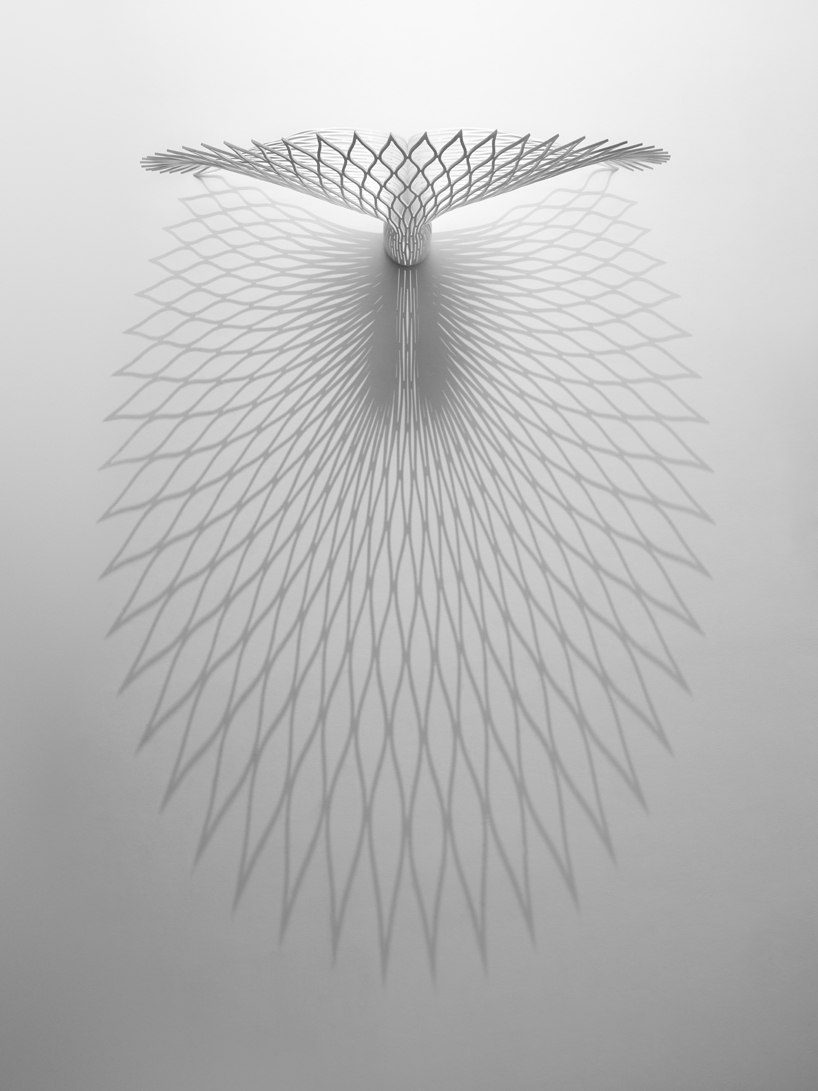
Like children playing with paper by simply cutting and folding it, the ’peacock’ chair designed by canadian firm uufie is constructed from a single sheet of acrylic composite material. Taking its namesake from the feathered animal, whose billowing tail opens into an expanse of pattern and color, the recliner’s back rest fans open in the same way, propelling in a sweeping curve. a delicate, lace-like motif spreads throughout the framework, yet the design is only optically fragile as its material is made structurally strong through the thermoforming process. The woven-like arrangement casts dramatic shadows onto the surface of the floor. The seating unit is available in three versions, a limited edition in large and smaller sizes, in both color and white. uufie is presenting the variations of ‘peacock’ at design miami/ as part of galleria rossana orlandi collection, and is also currently on exhibit at spazio rossana orlandi,

Photoshop has a powerful programming language built-in that allows you to record tasks as an 'action' and replay the steps to complete the task automatically. Not only can you record your own, but you can also import actions, opening up a whole range of effects and time-saving options. Here we've rounded up some of the best Photoshop actions that are free to download and install.
  • Read all our Photoshop posts here

01. Unspoken

 Unspoken
This simple action creates a beautiful blockbuster-film look, heightening details in your photographs and increasing contrast, while introducing a blue/green tint.
  • Good for: Photographers

02. Action 3D

 Action 3D
This quirky action from JonasFan93 creates a pseudo 3D anaglyphic image by separating out colour channels within your image and offsetting them. This freebie offers a number of different styles that are more suitable for use in printed brochures and website design where you’re aiming for a stylized effect.
  • Good for: Designers, photographers

03. Black and White Action

 Black & White action
This action creates a lovely black and white effect with a rich vignette and nice silver/sepia tint to the final treatment.
  • Good for: Photographers

04. Holgarizer

 Holgarizer
If you’re after a toy-camera-style effect, this action produces just that. Nice and simple to use, but very effective and convincing results (similar to Instagram images) including over-saturated colours, bleeding and heavy vignettes.
  • Good for: Photographers

05. HipstaRev - Pack 1

 HipstaRev pack 1
This set of actions creates hipstamatic-style images inside Photoshop. The download includes three actions, each of which creates a recognisable treatment including borders and noise.
  • Good for: Photographers

06. Art of Decay

 Art of Decay
This excellent free action creates a simple heavily-aged photo effect.
  • Good for: Photographers, designers

07. Black and White

 Black and White
This action adds a punchy high-contrast black & white effect to your photographs. It produces a nice grittiness with heavy grain and over-saturated blacks. Great for creating a stylized image.
  • Good for: Photographers

08. Page Curl

 Page Curl
This simple action is based on a tutorial on how to create a convincing page curl effect in Photoshop, but with the action there’s no need to take all the suggested steps - simple click and run for a handy time-saving effect ideal for web designers.
  • Good for: Designers

09. Dramatic Sepia

 Dramatic Sepia
This superb action offers a slightly more refined version of the standard sepia effect by adding a contrast curve to age the final result so that it feels like a faded photograph. Dramatic Sepia offers a great way to communicate a sense of age.
  • Good for: Photographers

10. Thinking of You

 Thinking of you
This is another stylized photographic treatment that adds a filmic, green-cast and heavily saturated shadows effect. The end result feels both blockbuster-movie-like, and very fashion orientated.
  • Good for: Photographers

11. High Key

 High key
This action requires a credit if you use it, but offers a very simple way to convert a regular photograph into a stunning high-key portrait with clean lines and an almost dreamy finish, without compromising essential areas of contrast.
  • Good for: Photographers

12. Teeth Whitening

 teeth whitening
Quickly and easily whiten teeth with a natural-looking result with this handy action from ModernActions. The script targets particular tones, brightening off-whites for a simple way to achieve a more pleasing set of gnashers!
  • Good for: Photographers

13. High Definition Sharpening

 High definition sharpening
The final stage of image preparation should be to sharpen your images according to the final delivery method - you sharpen differently for print or screen. This free action from MCP Actions offers a simple one-click solution to sharpening, with the ability to control the degree of sharpening that’s been applied after the fact by adjusting the opacity and masking of layers.
  • Good for: Photographers

14. Bella Action

 Bella action
This action adds a beautiful warmth to your photographs, bringing out rich tones in hair and skin, and softening colours with a pink cast that creates a romantic, nostalgic feel.
  • Good for: Photographers

15. Contact Lenses

 contact lenses
This simple set of actions allows you to quickly change the colour of eyes in your photos. Choose from a set of different actions according to the colour you’d like, and adjust for a final result. Great time-saver when you need to alter eye colour.
  • Good for: Photographers

16. Magic 3D

 Magic 3D
Want to go 3D with Photoshop actions? Create sophisticated pseudo-3D extrusions from text, shapes or layers with gloss and highlights using this great tool.
  • Good for: Graphic designers

17. Polanoid Generator 3

 Polanoid Generator 3
Turn any image into a Polaroid instantly with one of 10 different effects. Includes colour treatments and shadows automatically, and it's one of those Photoshop actions you'll use again and again.
  • Good for: Graphic designers

18. Soften Skin Effect

 soften skin effect
Used in combination with an existing selection or mask, this smooths skin while retaining textures and colouring saving clean-up time.
  • Good for: Photographers

19. Comic Action

 Comic action
Automatically turn your images into half-tone comic cells with hard outlines and simplified colours. Quirky and fun results!
  • Good for: Artists, graphic designers

20. Skin Glow Enhancements

 skin glow enhancements
That's right: Photoshop actions can improve your skin! Skin Glow Enhacements is an action that brings skin tones to life with a healthy glow. Also has the effect of warming the entire image slightly, making for a sun-kissed tone.
  • Good for: Photographers

21. Lithprint

 Lithprint
Create a lithograph-style image from your raw photos. This works best on larger images that have already been given a medium-contrast treatment.
  • Good for: Artists, graphic designers

22. Reflections

 reflections
Automatically create reflections of your images, either against a plain background or a fake horizon. Free registration is required to download.
  • Good for: Graphic designers

23. Wedding Enhancers Kit

 wedding enhancers kit
Photoshop actions are extremely useful for wedding photographers, dealing with a huge number of shots. Here you get a set of eleven actions that automatically create common portrait effects, especially around the theme of wedding photography. Includes skin smoothing and soft filter effects as well as b/w conversion.
  • Good for: Photographers

24. Pencil Draw

 pencil draw
This action uses contrast to find the edges in your image and automatically render a pencil sketch effect. Start from a full-colour image with no need to convert to black and white first.
  • Good for: Graphic designers

25. HDR Action

 HDR action
Remove the lack of contrast that comes with HDR photography with this set of four actions; HDR fix light, normal, heavy, and clicker.
  • Good for: Photographers

26. Old Photo Action

 old photo action
Want to make your images look like they've through a time warp? Then get experimenting with this old photo action, which adds colour and contrast.
  • Good for: Photographers

27. Cross-Processing Action

 cross-processing action
Create highly stylised images with drastically different colours and contrast.
  • Good for: Photographers 

28. Portrait Action

 portrait action
Desaturate the colour in your photography with this portrait action, which creates a gorgeous vintage effect.
  • Good for: Photographers

29. Split Toning Action

 split toning action
The area between greyscale and colour is split toning and adding this slight change to your photos can have a dramatic effect. You can also create retro and abstract images with this technique.
  • Good for: Photographers

30. Amatorka Action 2

 Amatorka action 2
Create an instant action-movie-style colour treatment with a blue-green cast, rich saturation and increased contrast.
  • Good for: Photographers

31. Photoshop Color Actions 2

 Phjotoshop colour actions 2
A nice range of colour treatments including rich grainy black and white, bleach bypass, and some heavy casting effects. Great for experimentation.
  • Good for: Photographers

32. Rusty Vintage

 Rusty
Vintage Photoshop actions are extremely popular. This one applies selective desaturation and colour correction to create a distinct vintage feel to your images.
  • Good for: Photographers

33. Hand-colored Vintage Photo

 hand-colored vintage photo
This action creates a heavily stylised vintage look, complete with rough paper edges and cracking. Produces really beautiful results ideal for retro-styled images.
  • Good for: Photographers

34. STICKERS n TAPE

 stickers n tape
Create round stickers with a curl in the corner, or polaroid-style images with clear sticky tape holding it in place. Site requires free registration to download action.
  • Good for: Graphic designers

35. 1930s Glitter Text

 1930s glitter text
Automatically convert your text into a snazzy 1930s-style retro treatment with shiny sequins and a nice 3D effect. It’s also easy to adjust after running the action as all the layers are retained.
  • Good for: Graphic designers